Unclouded Changes: The Highest-Risk Defect in Revision Management
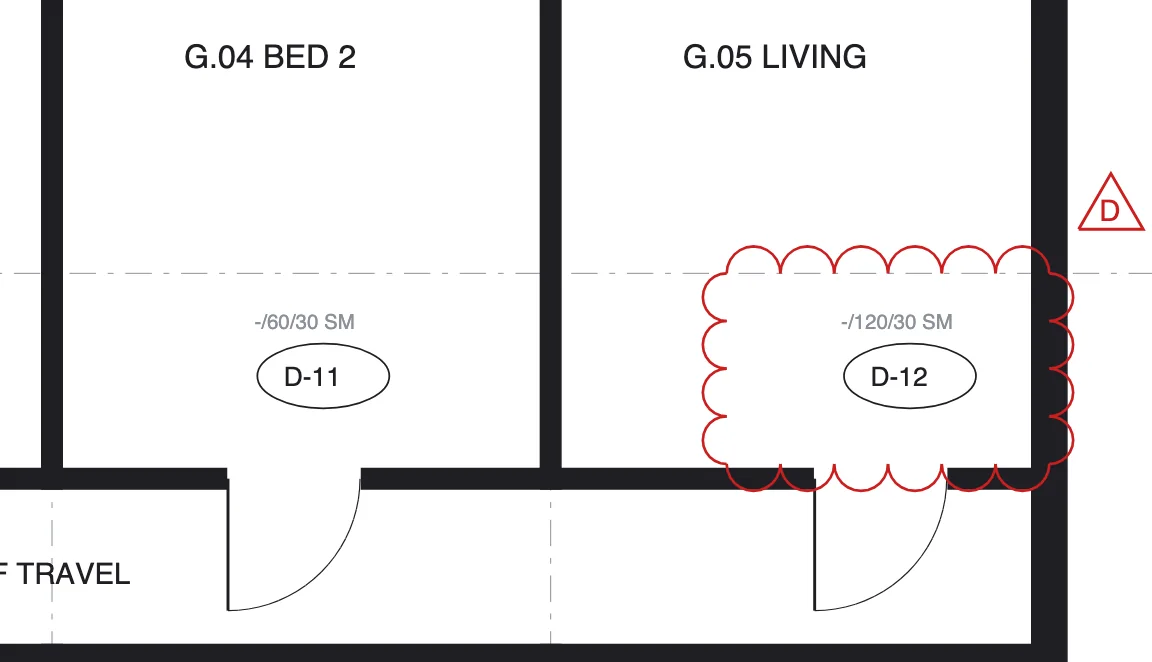
An unclouded change is a difference between two revisions of a drawing that carries no revision cloud and no amendment note — a moved doorway, an amended setdown, an FRL changed from -/60/30 to -/120/30 — leaving everyone downstream with no signal that anything changed. The revision letter ticked from C to D, the transmittal said "updated per fire engineer's advice", and somewhere on sheet 4 of 12 a wall moved 90 mm. Whoever built off the clouds owns the consequence.
How the clouding convention is supposed to work
A revision cloud is the scalloped outline drawn around changed content, usually paired with a numbered triangle keyed to the amendment schedule in the title block: "Δ D — Door D1.07 relocated, FRL amended per FER". The convention is a courtesy protocol between drafter and reader. It works only when the drafter clouds everything that changed and nothing that didn't — and there is no enforcement mechanism. The clouds are a claim, not a proof.
Downstream, everyone reads revisions through the clouds. A site engineer receiving 40 revised sheets does not re-read 40 sheets; they scan the clouds, brief the crews on those areas, and move on. That behaviour is rational and it is exactly why unclouded changes are so dangerous: the review process is optimised to look only where the author pointed.
How changes end up unclouded
- Model-driven ripple. In BIM-based workflows, a change to the model updates every sheet it appears on. The drafter clouds the sheet they were working on; the section three sheets later updated too, unclouded.
- Cloud hygiene gone wrong. Convention is to remove the previous revision's clouds before adding the new ones. In the cleanup, this revision's clouds get deleted along with the last one's.
- Global edits. A renumbered door schedule, a shifted grid, a changed keynote library — one edit, thirty sheets touched, three sheets re-reviewed.
- Quiet corrections. A consultant discovers their own error and fixes it in the next issue without drawing attention. Rare, but it happens, and the amendment note reads "minor updates".
Catching them: compare, don't trust
The only reliable method is to treat clouds as an index, not an inventory, and compare the revisions themselves:
- Pair every new revision with its predecessor. This sounds trivial and isn't, once numbering is inconsistent — see title-block metadata. If you can't reliably say what Rev D replaced, you can't compare it.
- Graphical comparison. Overlay or side-by-side with differences highlighted. Two caveats from practice: the sheets must be aligned first (scale, crop and rotation drift between issues, and a naive overlay produces a wall of false positives), and the difference markup should not rely on colour alone — on a fire plan, red and green already mean something.
- Text and table comparison. Graphical comparison misses what matters most on schedules: a door schedule where D1.07's FRL cell changed, an Rw rating dropped from 45 to 40, a slip rating removed from a finishes schedule. Schedule rows need text-level comparison, cell by cell.
- Reconcile against the clouds. The output that matters is the delta: changes detected that carry no cloud. Those go to the top of the review pile, each one a candidate for an RFI back to the consultant asking them to confirm and cloud the change formally.
Manually, this is an hour per drawing pair done properly, which is why it is almost never done properly. This is the class of work that automated comparison exists for: the machine flags "7 candidate changes, 3 unclouded" with the regions marked, and the human decides which matter. That is the shape of the ParitySense revision check — detection is automatic, judgement is not.
Process rules that reduce the intake
- Put clouding on the record. A standing line in consultant agreements or the DCP: all changes to be clouded and scheduled; unclouded changes to be notified when discovered.
- When you find one, RFI it — not to be difficult, but to convert an invisible change into a documented one with a date. The paper trail is the point. RFI mechanics are covered in RFI best practice.
- Track the rate per consultant. Three unclouded changes from the same office in a month is a conversation, not a coincidence.
- Keep superseded revisions accessible — you cannot compare against a predecessor someone deleted. See superseding without destroying history.
FAQ
What is a revision cloud?
A scalloped outline around changed drawing content, keyed by a revision triangle to the amendment note in the title block. It tells the reader where to look — and only works if the drafter clouds everything that changed.
What is an unclouded change?
A change between revisions carrying no cloud and no amendment note. The revision letter increments; the change itself is invisible to anyone reviewing by clouds.
Why do they happen?
Mostly accidents of BIM workflows: model changes rippling onto un-reviewed sheets, cloud cleanup removing current clouds, global edits touching thirty sheets. Occasionally quiet corrections.
How do you catch them?
Compare each new revision against its predecessor — aligned graphical overlay plus cell-level text comparison for schedules — and review every detected change that lacks a cloud.
Run it through ParitySense alongside your manual review and measure the delta.
See how it works