Home › Revision check
Revision check
Know what changed in a new issue — before it becomes a variation.
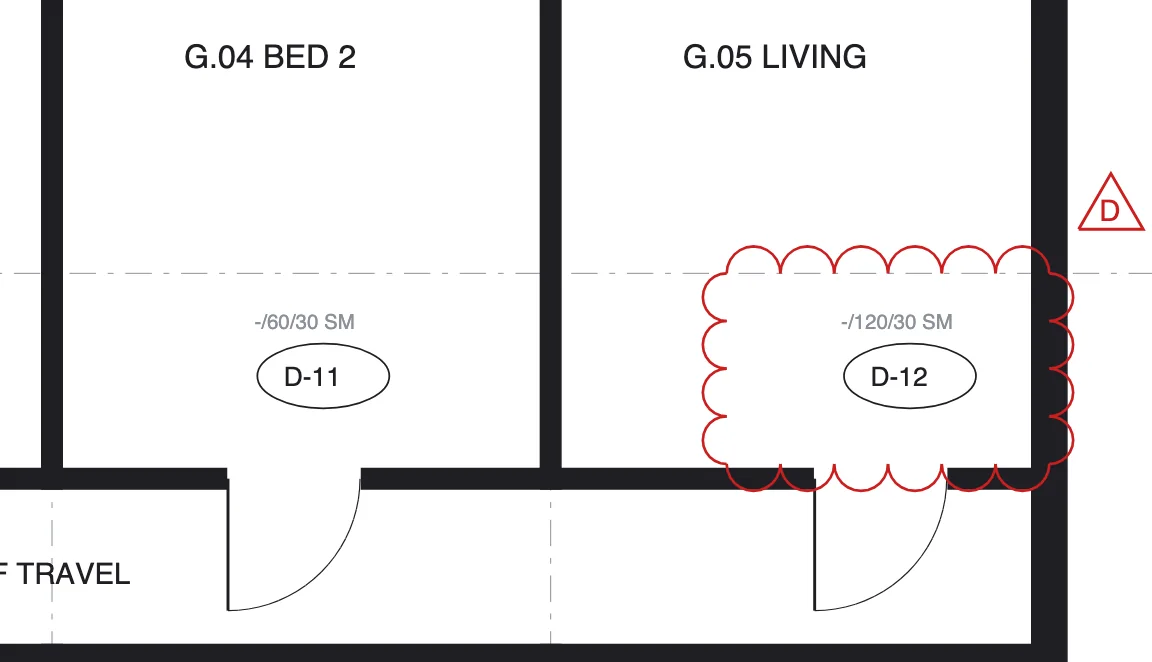
The moment a new issue lands, the revision agent pairs every sheet with its previous issue and lists each change, clouded or not. Your team reviews the changes instead of re-reading the set.
≈ 3,900 hours backa year — about $591k of senior time.
Modelled estimate — see the calculator.
What changes for your team
Less reading. Fewer surprises.
Today
- Two PDFs open side by side, sheet by sheet
- The clouds trusted as the full change list
- Unclouded edits found on site — as variations
- Hours of senior time on every issue
With ParitySense
- Sheets paired by drawing number, even when the set is reordered
- Every candidate change listed, unclouded ones first
- Caught at the desk, where a change costs least
- Minutes to review what actually changed
A day on site
Tuesday, 5 pm: Rev D of a 48-sheet set arrives. Twelve sheets changed; two edits on A101 have no cloud. By 5:30 the RFI is drafted and the review is signed.
Illustrative scenario.
Questions
What is an unclouded change?
A change to a drawing that was not marked with a revision cloud. They are easy to miss and often surface later as variations.
Do I upload the two revisions myself?
No. When a new set arrives, ParitySense finds the previous issue of each drawing and runs the revision check automatically.
Does it replace my review?
No. It shows candidate changes with their location and confidence; you decide what each one means.
Read more: Why unclouded revision changes cost money
More from ParitySense
Drawing register
A register that keeps itself current. No typing, no stale sheets.
Drawing register →RFI register
RFIs drafted from the evidence, on time and on the record.
RFI register →Tender vs contract
Find the cost hiding between what you priced and what you sign.
Tender vs contract →Compliance checks
Specialist agents check every set against the building code.
Compliance checks →See it on your own drawings.
A 30-minute demo, or a pilot on one live project.