Home › Drawing register
Drawing register
A drawing register that keeps itself current.
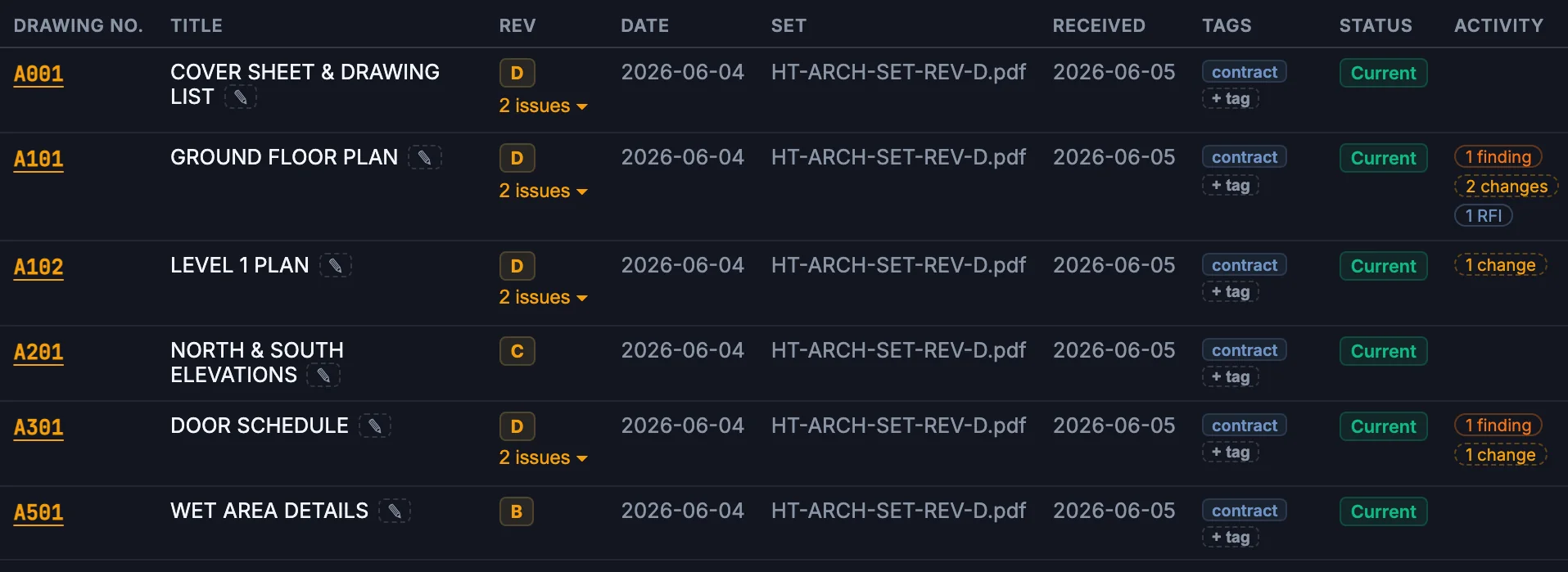
The register agent reads every title block — number, title, revision, date — so nobody types the register and nobody builds off a superseded sheet.
≈ 1,475 hours backa year — and no one on site with a superseded sheet.
Modelled estimate — see the calculator.
What changes for your team
Less reading. Fewer surprises.
Today
- Typed from title blocks, a sheet at a time
- One row per PDF, not per drawing
- “Which revision is current?” means opening files
- Superseded sheets still circulating
With ParitySense
- Read from the drawings themselves
- One row per drawing, grouped by discipline
- The current revision answered in seconds
- Superseded issues kept, marked, never deleted
A day on site
Monday morning the client asks which revision of the door schedule the builder has. You search A301: Rev D is current, Rev C was in the tender set. Answered before the call ends.
Illustrative scenario.
Questions
Do I have to rename my files?
No. ParitySense reads the drawing number, title and revision from each title block, whatever the file is called.
What if a title block is misread?
Correct it in the register. Corrections are kept if the set is read again, and each one is in the audit log.
Does it show documents as well as drawings?
Yes. Specifications, reports, schedules and contracts are listed one per row by type.
Read more: Drawing register best practices
More from ParitySense
Revision check
Know what changed in a new issue — including the edits nobody clouded.
Revision check →RFI register
RFIs drafted from the evidence, on time and on the record.
RFI register →Tender vs contract
Find the cost hiding between what you priced and what you sign.
Tender vs contract →Compliance checks
Specialist agents check every set against the building code.
Compliance checks →See it on your own drawings.
A 30-minute demo, or a pilot on one live project.