Blog › Document Control
Construction Document Control: The Complete Guide
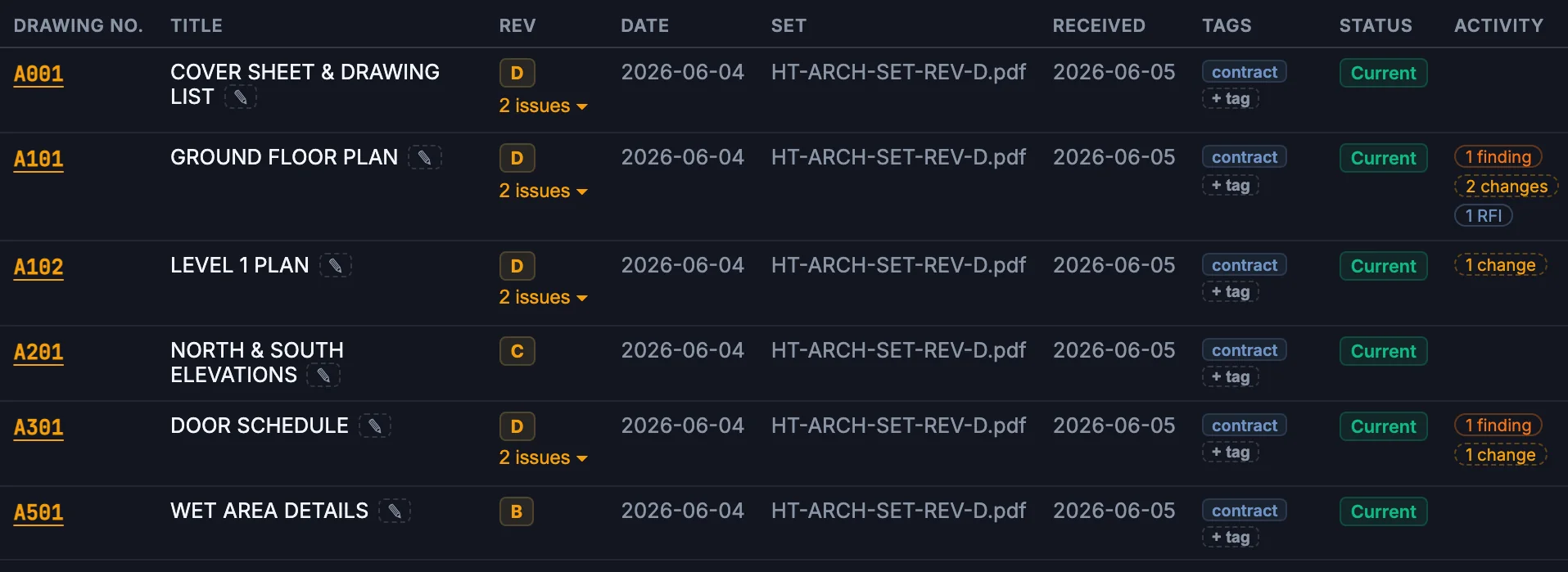
Document control is the discipline of managing which revision of every project document is current, who has been issued it, and what changed between revisions — so that everyone prices, builds and certifies from the same information. On an Australian project of any size, that means a drawing register, a revision and superseding process, transmittals with proof of issue, and an audit trail that survives a dispute. Get it right and it is invisible. Get it wrong and you pour a slab off Rev C while the engineer is certifying Rev E.
This guide covers the full lifecycle, the common failure modes, and where automation genuinely helps versus where a human must stay in the loop. It is written for contract administrators and document controllers on residential and commercial projects, working in Aconex, Procore, or a shared drive with a spreadsheet.
Why projects fail at document control
Nobody sets out to build from a superseded drawing. Failures follow a predictable pattern:
- Volume in bursts. Design development is quiet for a fortnight, then 140 revised drawings land the Friday before a program milestone. The register update gets triaged; triage becomes backlog; backlog becomes fiction.
- Inconsistent metadata. The architect issues A-102 Rev D; the hydraulic consultant issues H1002[C]; the structural engineer's title block says "Revision: 4, Issue: For Construction". A register can only be as reliable as the numbering feeding it. See title blocks and document numbering.
- Unclouded changes. A consultant amends a dimension or an FRL between revisions and does not cloud it. The transmittal says "general revision" and the change reaches site unnoticed. This is the single highest-risk defect in revision management — see unclouded revision changes.
- Superseded documents in circulation. A subcontractor prints Rev B in week 3 and works from the print for the next two months. Unless superseding produces an active notification and the old revision is clearly stamped, paper wins.
- Destroyed history. The opposite failure: someone "cleans up" the folder and deletes old revisions. Six months later a variation dispute turns on what Rev C actually showed, and it is gone. See superseding without destroying history.
The lifecycle: register, revise, supersede, transmit
1. The register
The drawing register is the master index: document number, title, discipline, current revision, revision date, status, and issue history. It is the document a certifier, an auditor, or a barrister will ask for first. A register that lists Rev D while the last transmittal shows Rev E was issued is not a register; it is a liability. Practical standards for keeping one are covered in drawing register best practices.
2. Revision
A revised document arrives. Before it enters the register, three questions: What is it (classification)? What does it replace (prior-version identification)? What changed (revision review)? On most projects the third question is answered by trusting the revision clouds and the amendment note in the title block — which is exactly the trust that unclouded changes exploit.
3. Superseding
The prior revision changes status from current to superseded. It is not deleted, not hidden, not renamed. Findings, RFIs and approvals raised against Rev C stay attached to Rev C; they do not silently migrate to Rev D, because a response to a question about Rev C may not apply to Rev D. Superseding is a status change with a timestamp and an actor, and it should be reversible if done in error.
4. Transmittal
Issue the new revision to the parties who hold the old one, with a record of who received what and when. In Aconex-style workflows the transmittal is the contractual proof of issue. Where a time-bar runs from receipt of information, the transmittal date is what the claim stands on.
Manual vs automated document control
The manual baseline: a document controller opens each PDF, reads the title block, updates the register row, files the document, marks the prior revision superseded, and eyeballs the drawing for clouds. At 3–5 minutes per document that is manageable at 20 documents a week and hopeless at 200. The tasks that break first — metadata entry and change detection — are exactly the ones machines do well.
What automates cleanly:
- Title-block extraction — number, title, revision, date pulled from the PDF and pre-filled into the register.
- Classification — drawing vs schedule vs specification vs report, with a confidence score; low-confidence results go to a human.
- Prior-version pairing — matching A-102 Rev D to A-102 Rev C automatically, including across imperfect numbering.
- Change detection — comparing revisions graphically and textually, and flagging changes with no revision cloud.
What should stay human: accepting a classification the system was unsure about, confirming a supersede, deciding whether a detected change matters, and issuing anything to another party. Automation that quietly makes those decisions produces a register nobody trusts. Automation that prepares them with evidence, then waits for a click, is the pattern that works — it is how the ParitySense revision workflow is built.
Who owns what
Document control fails fastest when ownership is ambiguous, so make it explicit:
- Document controller (or the CA wearing that hat on smaller jobs): owns the register, processes transmittals, executes supersedes, chases missing documents. The role is administrative but the judgement calls — "is this really a new revision of that drawing?" — are not trivial.
- Contract administrator: owns the consequences. Decides what a detected change means commercially, raises the RFIs, runs the variation and time-bar clocks that document dates feed. The CA should never be transcribing title blocks; that is machine work or controller work.
- Consultants: own the accuracy of their own metadata — title blocks, revision letters, clouds, amendment notes. Put those obligations in writing at engagement; they are unenforceable retrofitted.
- Site: owns the discipline of checking currency before set-out on anything structural, fire-rated or waterproofed. No register survives contact with a two-month-old print unless site culture backs it.
Knowing whether it's working
Document control is usually judged by vibe — "we're on top of it" — until a dispute proves otherwise. Four measurable signals tell you the truth earlier:
- Register latency. Days between a document's revision date and its appearance in the register as current. Under two days is healthy; over a week means site is working from stale state.
- Pairing rate. Proportion of incoming revisions automatically and correctly matched to their predecessor. Low pairing rates almost always trace to metadata inconsistency, not tooling.
- Unclouded change rate. Detected changes lacking clouds, per consultant per month. This number should trend down once consultants know someone is comparing their issues; if it doesn't, escalate.
- Reconciliation drift. Discrepancies found in the monthly comparison against consultants' issued lists. Zero is suspicious; a stable handful is normal; a growing count is the early warning.
None of these require sophisticated tooling to track — a column in the register and a monthly half-hour will do — but they convert "are we in control?" from an opinion into a trend line.
Document control as a compliance input
Document control is not only a versioning problem. The set has to be internally consistent: the door schedule has to agree with the fire engineering drawings, the wet-area details with the AS 3740 requirements the specification invokes, the footing design with the geotech report. A perfect register full of contradictory documents still fails. That reconciliation problem has its own guide: checking design documents against Australian Standards.
FAQ
What is document control in construction?
The discipline of managing which revision of every drawing, schedule, specification and contract document is current, who holds it, and what changed between revisions — so every party prices, builds and certifies from the same information.
Why do projects fail at it?
Volume and inconsistency: revision bursts that outrun the register, inconsistent title blocks and numbering, unclouded changes nobody flags, and superseded drawings left in circulation on site.
Should superseded drawings be deleted?
No. Change their status, keep them retrievable, and keep their findings and RFIs attached to them. Old revisions are the evidence a variation or defect dispute is decided on.
How much of this can be automated?
Extraction, classification, revision pairing and change detection automate well. Decisions — accepting changes, superseding, issuing RFIs — should stay human, with the automation supplying evidence.
Run it through ParitySense alongside your manual review and measure the delta.
See how it works